CS-466/566: Math for AI

Module 01: The Geometry of Data

Dr. Mahmoud Mahmoud

The University of Alabama

2026-03-23

TABLE OF CONTENTS

1. Introduction
2. What are Vectors?
3. The Formal Structure
4. Coordinate Systems & Basis
5. Vector Norms
6. The Dot Product
7. Python: NumPy

Mathematical Foundations of AI/ML

The Language of Data The mathematics of machine learning rests upon three pillars: linear algebra, calculus, and probability theory.
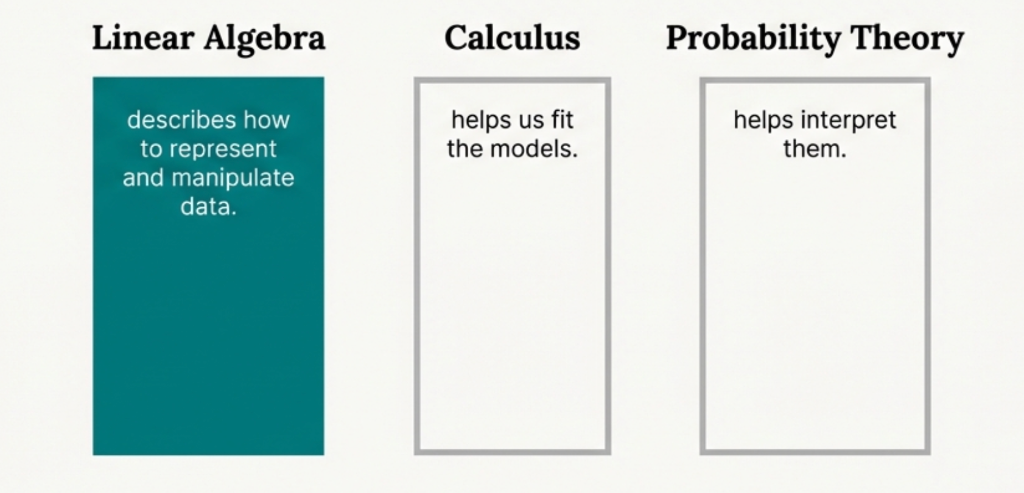
We will start at the beginning: representing and manipulating data.

The Iris Dataset

To guide our journey, we will use the famous Iris dataset. It contains measurements from three species of Iris flower.

Each data point (a sample) includes four measurements: sepal length, sepal width, petal length, and petal width.

  • Iris setosa
  • Iris versicolor
  • Iris virginica

Each measurement type is a feature. The dataset contains 150 samples and 4 features.
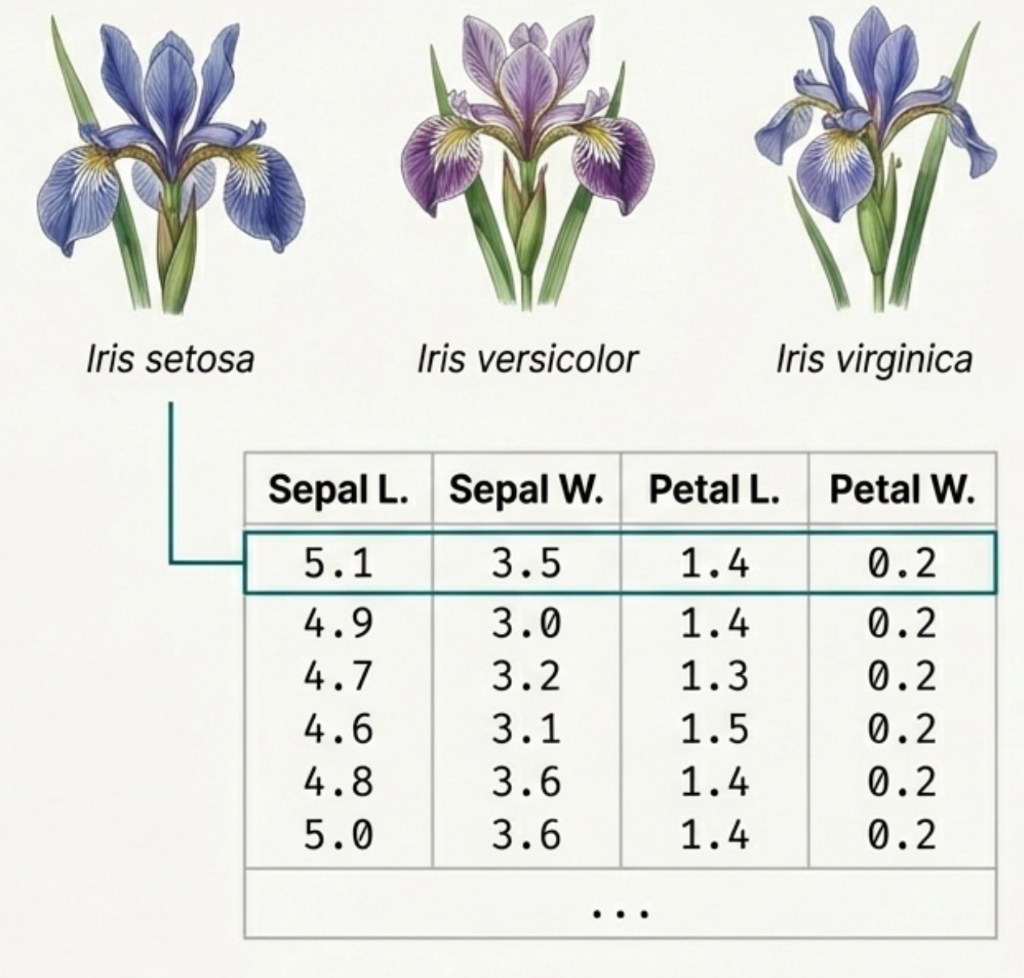
TABLE OF CONTENTS

1. Introduction
2. What are Vectors?
3. The Formal Structure
4. Coordinate Systems & Basis
5. Vector Norms
6. The Dot Product
7. Python: NumPy

What is a Vector?

  • Represents movement or direction in physical space, data space, or parameter space.
  • In ML: list of attributes, e.g., a car’s [cost, emissions, top speed].
  • Vector r = [3, 2, 4]: arrow from origin to point (3, 2, 4)
  • Components: projections onto x, y, z axes (dashed lines)
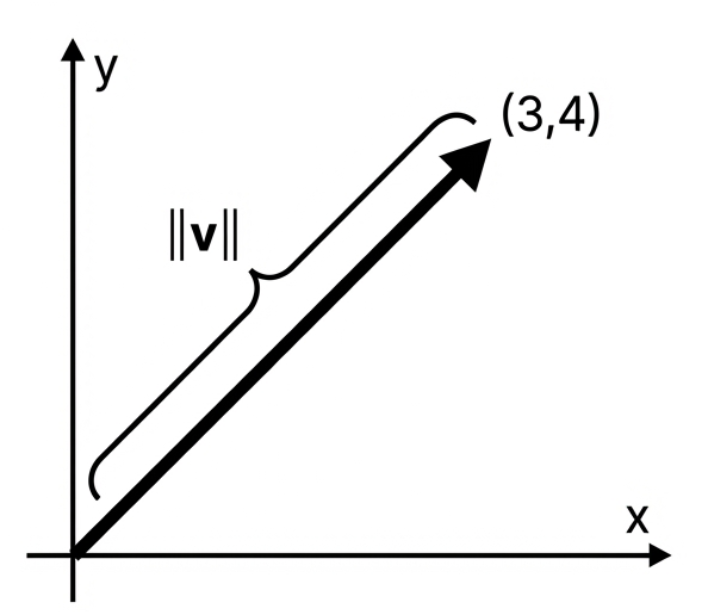
  • Magnitude: \(|\mathbf{r}| = \sqrt{3^2 + 2^2 + 4^2} = \sqrt{29} \approx 5.39\)
  • Direction: determined by the ratios of components

Why Use Vectors?

  • Compact Representation: Store multiple attributes (features) in a single mathematical object.
  • Efficient Computation: Operations on vectors (addition, dot product) can be parallelized (SIMD).
  • Geometric Interpretation: Allows us to visualize data relationships (distance, angle).
  • Basis for Matrix/Tensor: Foundation for representing higher-dimensional data and transformations.

Tip

In AI, we treat everything (images, text, audio) as vectors to apply mathematical transformations!

Vector Operations (Addition)

Vector Addition Animation

  • Addition: \((r + s = s + r)\), commutative & associative
  • Parallelogram Rule: tip-to-tail method
  • r = [3, 2] (red vector)
  • s = [1, -1] (blue vector)
  • r + s = [4, 1] (green vector)
  • Dashed lines show parallelogram construction

Vector Operations (Scalar Multiplication)

Scalar Multiplication Animation

  • Scalar Multiplication: scales length, preserves/reverses direction
  • Original vector v = [3, 2] (blue)
  • 0.5v: half length, same direction (orange)
  • 1.5v: 1.5× length, same direction (green)
  • -v: same length, opposite direction (red)
  • All vectors are collinear (same line)

The Rules of the Game

The intuitive operations we performed follow a consistent set of rules. These rules define the structure that our vectors live in.

Vector Addition \((+: V \times V \to V)\)

  • \(x + y = y + x\) (Commutativity)
  • \((x + y) + z = x + (y + z)\) (Associativity)
  • Existence of a null vector (\(x + 0 = x\))
  • Existence of an additive inverse (\(x + (-x) = 0\))

Scalar Multiplication \((\cdot: \mathbb{F} \times V \to V)\)

  • \(a(bx) = (ab)x\) (Associativity)
  • \(a(x + y) = ax + ay\) (Distributivity)
  • \((a + b)x = ax + bx\) (Distributivity)
  • \(1x = x\) (Identity element)

A Vector Space Defined

This collection of objects and rules forms a vector space. It is a mathematical structure \((V, \mathbb{F}, +, \cdot)\) where:

  • \(V\) is a set of vectors (like our Iris data points).
  • \(\mathbb{F}\) is a field of scalars (for us, the real numbers \(\mathbb{R}\)).
  • \(+\) is the vector addition operation.
  • \(\cdot\) is the scalar multiplication operation.

Key Insight: Our Iris dataset, represented as tuples in \(\mathbb{R}^4\), forms a vector space. This is the structure that guarantees our scaling operations are mathematically sound. The definition is not arbitrary; it’s formalised in hindsight to capture our geometric intuition.

TABLE OF CONTENTS

1. Introduction
2. What are Vectors?
3. The Formal Structure
4. Coordinate Systems & Basis
5. Vector Norms
6. The Dot Product
7. Python: NumPy

Vector Space Requirements

Let \(V\) be a set of vectors and \(\mathbb{F}\) a field of scalars. \(V\) is a vector space over \(\mathbb{F}\) if:

  1. Closure under addition \(u, v \in V \implies u + v \in V\)

  2. Additive identity \(\exists 0 \in V\) such that \(v + 0 = v\)

  3. Additive inverse \(\forall v \in V, \exists (-v) \in V\) such that \(v + (-v) = 0\)

  4. Closure under scalar multiplication \(a \in \mathbb{F}, v \in V \implies av \in V\)

  5. Distributivity over vector addition \(a(u + v) = au + av\)

  6. Distributivity over scalar addition \((a + b)v = av + bv\)

  7. Scalar identity \(1v = v\)

\((V, \mathbb{F}, +, \cdot)\) is a vector space over \(\mathbb{F}\) if it satisfies the above properties.

Vectors Terminology

What is this notation? (\(\mathbb{Z}_2^3, \mathbb{Z}_2, +, \cdot\))

  • \(\mathbb{Z}_2\): The set of scalars \(\{0, 1\}\).
  • \(\mathbb{Z}_2^3\): Vectors of length 3 where entries are from \(\mathbb{Z}_2\).
    • Example: \((1, 0, 1) \in \mathbb{Z}_2^3\).
  • \(+\): Component-wise addition modulo 2.
  • \(\cdot\): Scalar multiplication modulo 2.

Check Your Understanding 2

Let’s warm up with “Binary Arithmetic” (where \(1+1=0\)).

  1. In \(\mathbb{Z}_2\), what is \(1 + 1 + 1\)?
      Answer: 1 (since \(1+1=0\), then \(0+1=1\))

  2. In \(\mathbb{Z}_2^3\), compute \(\mathbf{u} + \mathbf{v}\) for \(\mathbf{u}=(1,0,1)\) and \(\mathbf{v}=(1,1,0)\).
      Answer: (0, 1, 1)

  3. Is the vector \((2, 0)\) in \(\mathbb{Z}_2^2\)?
      Answer: No (Elements must be 0 or 1)

Exercise

Show that \((\mathbb{Z}_2^2, \mathbb{Z}_2, +, \cdot)\) is a vector space.

Proof Sketch: Check the 7 requirements for vectors \(\mathbf{u} = (u_1, u_2) \in \mathbb{Z}_2^2\):

  1. Closure (+): \((u_1+v_1, u_2+v_2) \in \mathbb{Z}_2^2\) since sums are mod 2.
  2. Add. Identity: \(\mathbf{0} = (0,0)\) exists (\(\mathbf{u} + \mathbf{0} = \mathbf{u}\)).
  3. Add. Inverse: \(-\mathbf{u} = \mathbf{u}\) (since \(1+1=0 \implies -1=1\)).
  4. Closure (\(\cdot\)): \(c(u_1, u_2) = (cu_1, cu_2) \in \mathbb{Z}_2^2\) for \(c \in \{0,1\}\).
  5. Distributivity (Vector): \(c(\mathbf{u}+\mathbf{v}) = c\mathbf{u} + c\mathbf{v}\).
  6. Distributivity (Scalar): \((a+b)\mathbf{u} = a\mathbf{u} + b\mathbf{u}\).
  7. Scalar Identity: \(1 \cdot \mathbf{u} = \mathbf{u}\).

TABLE OF CONTENTS

1. Introduction
2. What are Vectors?
3. The Formal Structure
4. Coordinate Systems & Basis
5. Vector Norms
6. The Dot Product
7. Python: NumPy

Basis Vectors & Coordinates

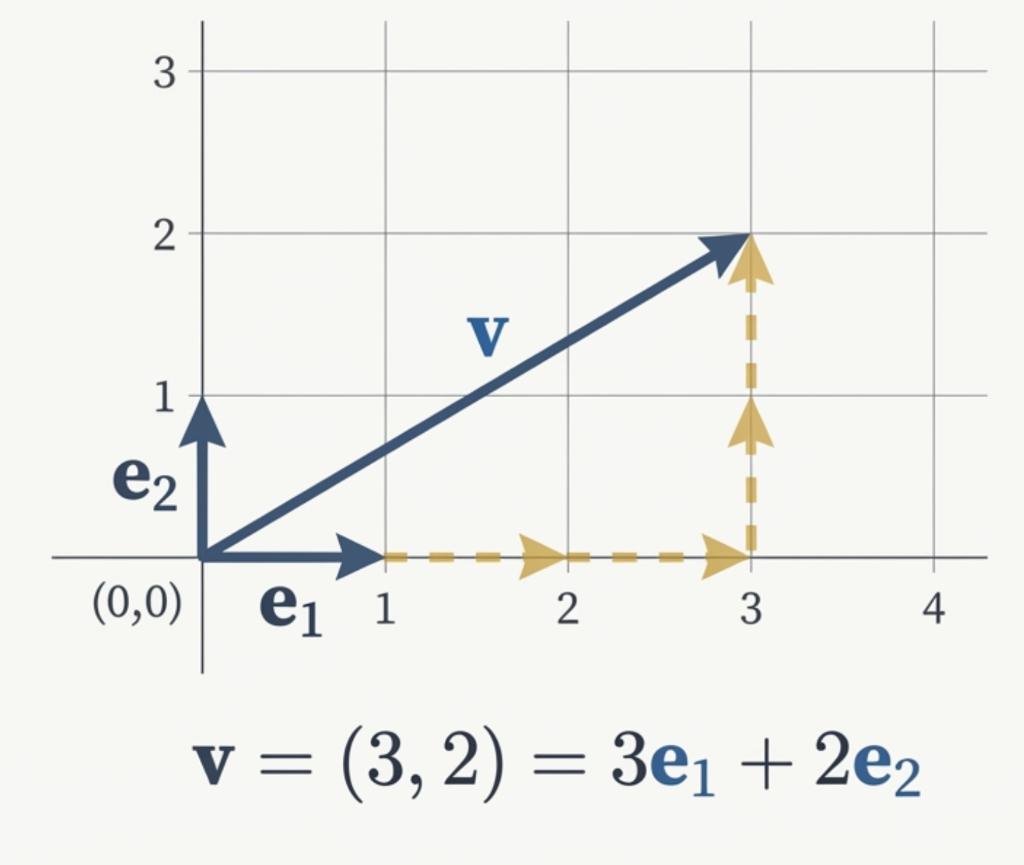
We represent the vector \(\mathbf{v}\) with the coordinate pair \((3, 2)\).

This is shorthand for saying we take 3 steps along the first axis and 2 steps along the second.

These “steps” are defined by a special set of vectors: \(\mathbf{e}_1\) and \(\mathbf{e}_2\).

Defining the Basis

The basis vectors are the fundamental reference directions we agree upon.

For 2D space (\(\mathbb{R}^2\)), we typically use:

  • \(\mathbf{e}_1 = (1, 0)\) : “One step East”
  • \(\mathbf{e}_2 = (0, 1)\) : “One step North”

Every other vector is just a weighted sum of these two.

Think of it like a recipe:

If \(\mathbf{e}_1\) is “Cups of Flour” and \(\mathbf{e}_2\) is “Cups of Sugar”…

Then the vector \(\mathbf{v} = (3, 2)\) is the mix: \[ 3 \times \text{Flour} + 2 \times \text{Sugar} \]

Linear Combinations

Coordinates are simply the instructions - the recipe - for building a vector using a pre-agreed set of “building block” vectors.

This recipe is called a linear combination.
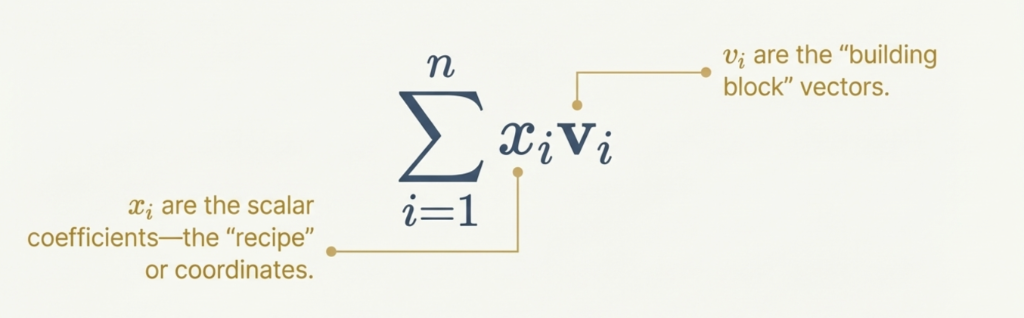
The same vector can have different coordinates if we change the building blocks.

Our mission is to understand what makes a good set of building blocks.

Check Your Understanding 1

  • If we choose a different set of basis vectors to describe the same physical arrow \(\mathbf{v}\):

  • Suppose our new basis vectors are twice as long (\(\mathbf{u}_1 = 2\mathbf{e}_1, \mathbf{u}_2 = 2\mathbf{e}_2\)). To build the same vector \(\mathbf{v}\) that was \((4, 6)\) before, what are the new coordinates?

The Span

For a set of vectors \(S = \{\mathbf{u}, \mathbf{v}\}\), its span is the set of all possible linear combinations of those vectors.


If \(\text{span}(S) = V\), we say \(S\) is a generating set for the vector space \(V\).
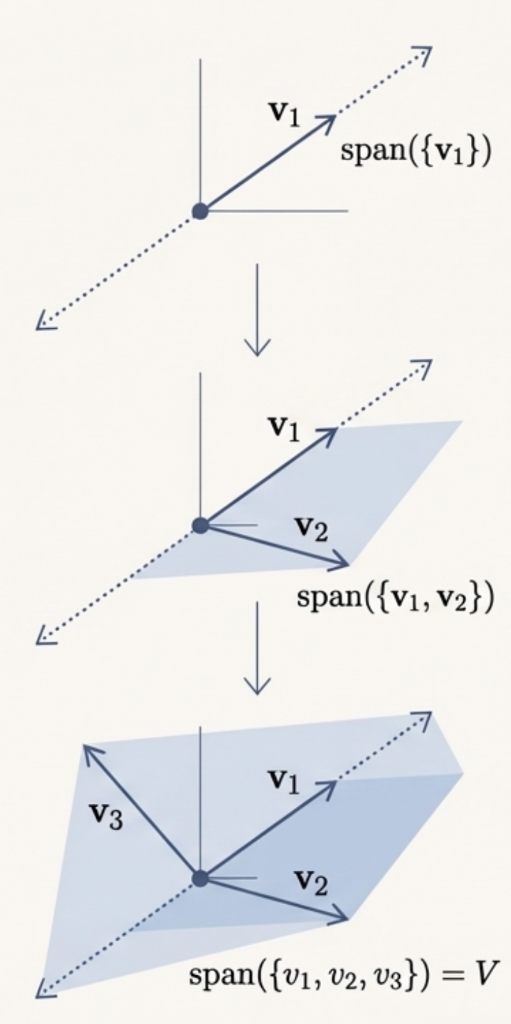
Linear Independence: Is this a Basis?

Consider the set \(S = \{v_1, v_2, v_3\}\) where: \[v_1 = (1,0), \quad v_2 = (0,1), \quad v_3 = (1,1)\]

Question: Is \(S\) a basis for \(\mathbb{R}^2\)?

Answer: No.

Why? Because it contains redundant information (violates independence). For example, the vector \((2,1)\) has multiple recipes:

\[ (2,1) = 2v_1 + v_2 \] \[ (2,1) = v_1 + v_3 \]

Defining the Basis

The ideal ‘skeleton’ for a vector space must have maximum reach and zero redundancy. This perfect set is called a basis.
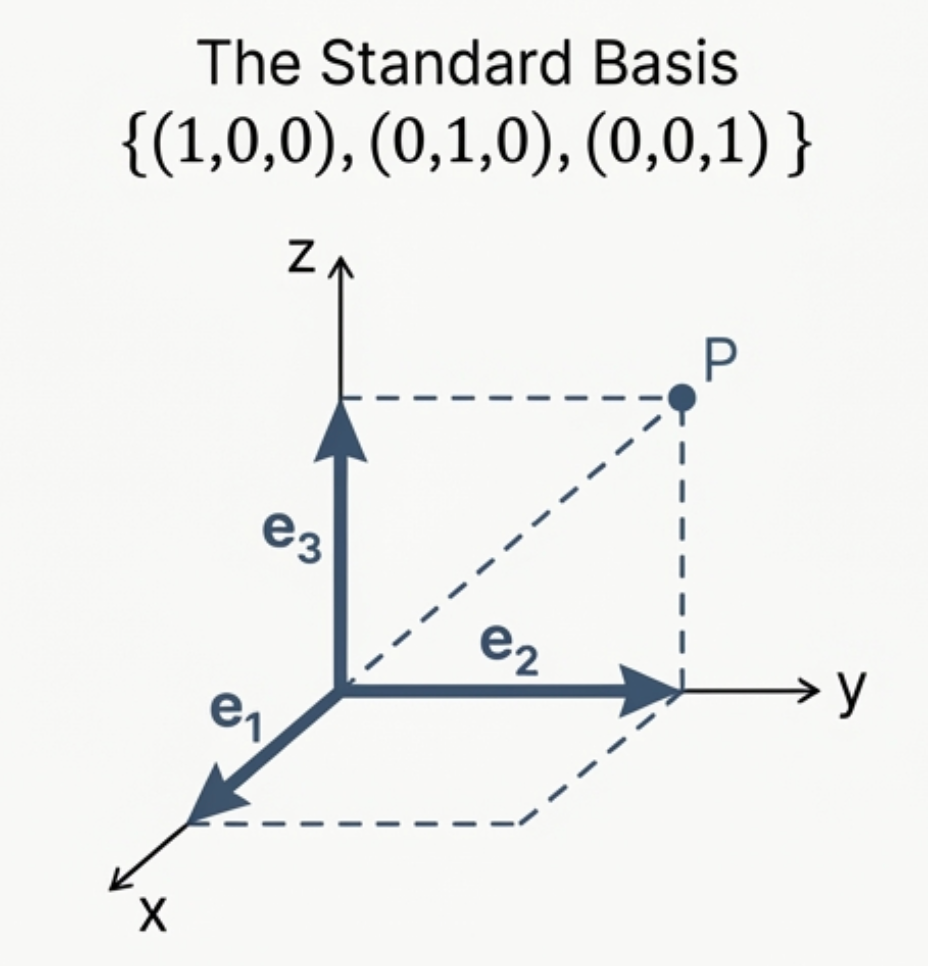
Definition 4. (Basis)

Let \(V\) be a vector space and \(S\) be a subset of its vectors. \(S\) is a basis of \(V\) if:

(a) \(S\) is linearly independent. (Efficiency)

(b) \(\text{span}(S) = V\). (Reach)

How to Check if a Set is a Basis?

The “Goldilocks” Test: Compare vector count (\(k\)) to dimension (\(n\)).

\(k < n\)
Too Few
Cannot span space
\(k = n\)
Just Right?
Check Determinant \(\neq 0\)
\(k > n\)
Too Many
Must be dependent

Or test manually for linear independence!

A Basis Hits the Sweet Spot

A basis is perfectly balanced. It contains the exact amount of information needed to describe the entire space, no more and no less.

Property 1: Maximal Linear Independence

Adding any other vector from the space to a basis will make the set linearly dependent.

A basis is a maximal linearly independent set.

Property 2: Minimal Generating Set

Removing any single vector from a basis means it can no longer span the entire space.

A basis is a minimal generating set.

Every vector in a basis is essential.

Exercise.

Are the following vector sets linearly independent?
  1. \(S_1 = \{(1,0,0),(1,1,0),(1,1,1)\} \subseteq \mathbb{R}^3\)
      Yes. (determinant \(\neq 0\))

  2. \(S_2 = \{(1,1,1),(1,2,4),(1,3,9)\} \subseteq \mathbb{R}^3\)
      Yes. (determinant \(\neq 0\))

  3. \(S_3 = \{(1,1,1),(1,1,-1),(1,-1,-1)\} \subseteq \mathbb{R}^3\)
      Yes. (determinant \(\neq 0\))

  4. \(S_4 = \{(\pi,e), (-42,13/6), (\pi^3,-2)\} \subseteq \mathbb{R}^2\)
      No. (3 vectors in \(\mathbb{R}^2\) \(\to\) too many!)

TABLE OF CONTENTS

1. Introduction
2. What are Vectors?
3. The Formal Structure
4. Coordinate Systems & Basis
5. Vector Norms
6. The Dot Product
7. Python: NumPy

The Definition of Magnitude

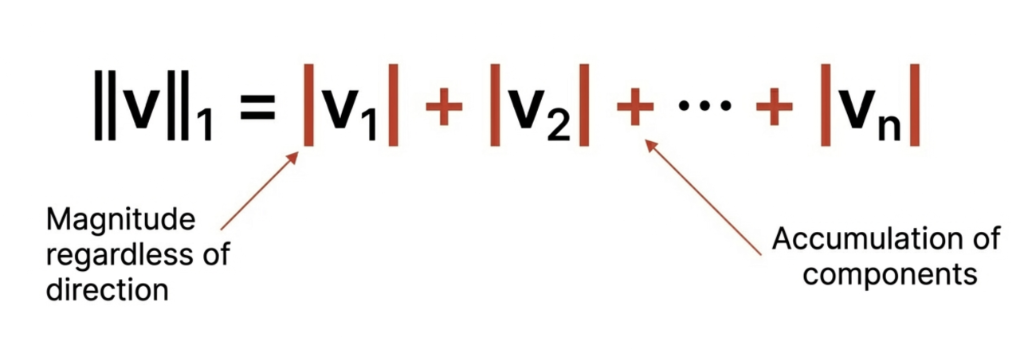
Definition: In vector space, a Norm is the function that assigns a strictly positive length or size to a vector.

Common Norms

\(L^2\) (Euclidean) – Most common in ML
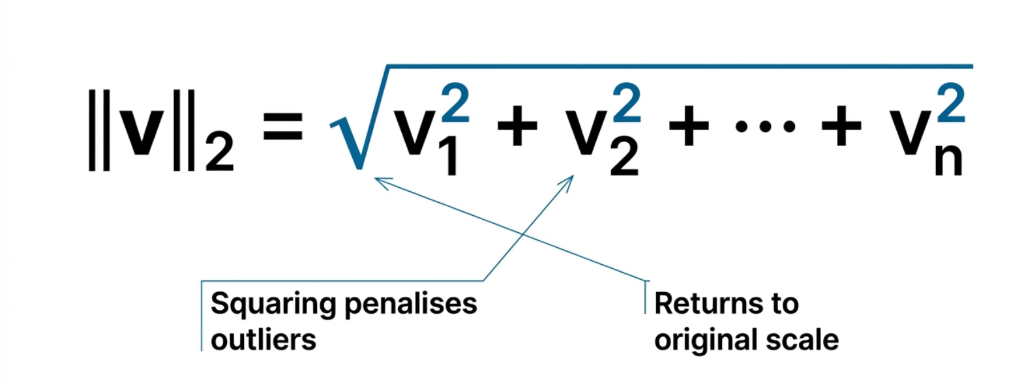
\(L^1\) (Manhattan) – Used in regularization
\(L^\infty\) (Max) – Largest component
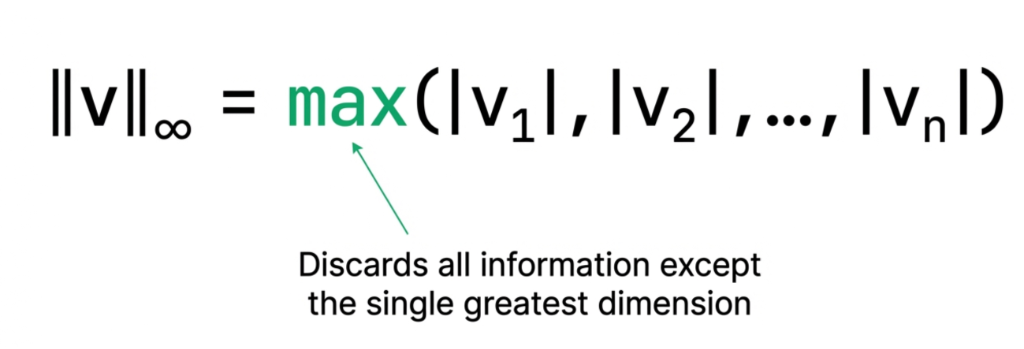
TABLE OF CONTENTS

1. Introduction
2. What are Vectors?
3. The Formal Structure
4. Coordinate Systems & Basis
5. Vector Norms
6. The Dot Product
7. Python: NumPy

Dot Product: Definition

The dot product (or inner product) of two vectors \(\mathbf{u}\) and \(\mathbf{v}\) is:

\[\mathbf{u} \cdot \mathbf{v} = u_1 v_1 + u_2 v_2 + \cdots + u_n v_n = \sum_{i=1}^{n} u_i v_i\]

Element-wise multiply → Sum all products

Example:

\[\begin{bmatrix} 1 \\ 2 \\ 3 \end{bmatrix} \cdot \begin{bmatrix} 4 \\ 5 \\ 6 \end{bmatrix} = \begin{bmatrix} 1 \times 4 \\ 2 \times 5 \\ 3 \times 6 \end{bmatrix} = \begin{bmatrix} 4 \\ 10 \\ 18 \end{bmatrix} \rightarrow 4 + 10 + 18 = 32\]

Dot Product: Geometric Interpretation

The dot product relates to the angle \(\theta\) between vectors:

\[\mathbf{u} \cdot \mathbf{v} = \|\mathbf{u}\| \|\mathbf{v}\| \cos(\theta)\]

  • If \(\mathbf{u} \cdot \mathbf{v} > 0\): Angle is acute (\(\theta < 90°\))
  • If \(\mathbf{u} \cdot \mathbf{v} = 0\): Vectors are orthogonal (\(\theta = 90°\))
  • If \(\mathbf{u} \cdot \mathbf{v} < 0\): Angle is obtuse (\(\theta > 90°\))

Dot Product: Interactive Visualization

Dot Product is maximum when vectors are in the same direction and minimum when they are in opposite directions.

TABLE OF CONTENTS

1. Introduction
2. What are Vectors?
3. The Formal Structure
4. Coordinate Systems & Basis
5. Vector Norms
6. The Dot Product
7. Python: NumPy

NumPy: Creating Vectors

import numpy as np

#> Create vectors
v = np.array([3, 2, 4])
u = np.array([1, -1, 2])

print(f"v = {v}") #> formatted string literal
print(f"u = {u}")
print(f"Shape: {v.shape}")
v = [3 2 4]
u = [ 1 -1  2]
Shape: (3,)

NumPy: Vector Operations

import numpy as np
v = np.array([3, 2, 4])
u = np.array([1, -1, 2])

#> Vector addition
print(f"v + u = {v + u}")

#> Scalar multiplication
print(f"2 * v = {2 * v}")

#> Magnitude (norm)
print(f"|v| = {np.linalg.norm(v):.4f}")
v + u = [4 1 6]
2 * v = [6 4 8]
|v| = 5.3852

NumPy: Linear Independence Check

#> Check if vectors are linearly independent
#> by computing the determinant of the matrix they form
S = np.array([
    [1, 0, 0],
    [1, 1, 0],
    [1, 1, 1]
])

det = np.linalg.det(S)
print(f"Matrix:\n{S}")
print(f"Determinant = {det:.1f}")
print(f"Linearly Independent? {'Yes' if det != 0 else 'No'}")
Matrix:
[[1 0 0]
 [1 1 0]
 [1 1 1]]
Determinant = 1.0
Linearly Independent? Yes

Why Vectorize? Speed Comparison

import time

n = 1_000_000
a = np.random.rand(n)
b = np.random.rand(n)
#> For loop approach
start = time.time()
result_loop = 0
for i in range(n):
    result_loop += a[i] * b[i]
loop_time = time.time() - start
#> Vectorized approach
start = time.time()
result_vec = np.dot(a, b)
vec_time = time.time() - start

print(f"For loop: {loop_time:.4f}s")
print(f"Vectorized: {vec_time:.6f}s")
print(f"Speedup: {loop_time/vec_time:.0f}x faster!")
For loop: 0.1106s
Vectorized: 0.000341s
Speedup: 324x faster!

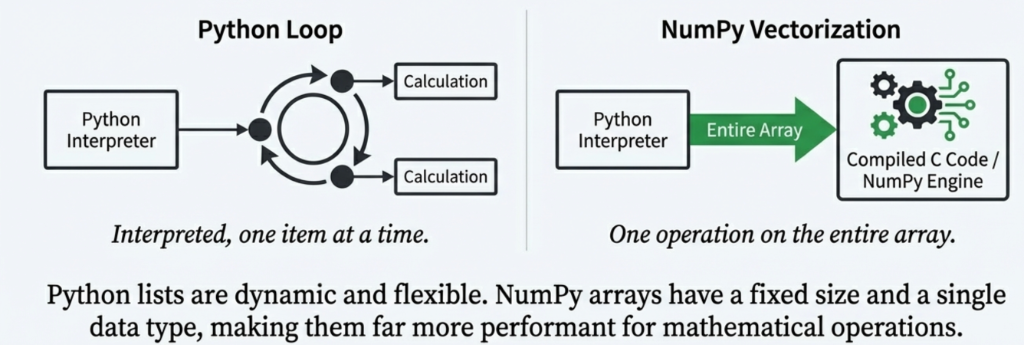
Vectorization: Visual Comparison

  • Vectorization is the process of converting a loop-based algorithm into a vector-based algorithm.
  • GPUs are designed to perform vectorized operations.
Exercise: Standard vs Vectorized

Write two Python functions to compute the Euclidean distance between two vectors:

  1. euclidean_loop(a, b) — using a for loop

  2. euclidean_vectorized(a, b) — using NumPy operations only

  3. Compare their speed on vectors of size 1,000,000

\[d(\mathbf{a}, \mathbf{b}) = \sqrt{\sum_{i=1}^{n} (a_i - b_i)^2}\]

Thank You!

document.addEventListener("DOMContentLoaded", function() { function handleQuizClick(e) { // Find closest list item const li = e.target.closest('li'); if (!li) return; // Find the checkbox strictly within this LI (not nested deeper) // We can check if the checkbox's closest LI is indeed this LI. const checkbox = li.querySelector('input[type="checkbox"]'); if (!checkbox) return; // Verify strict parent-child relationship to avoid triggering when clicking parent Question LI if (checkbox.closest('li') !== li) return; // We found a quiz item! // Prevent default only if we are handling it. // If the user clicked the checkbox directly, it might toggle. We want to force it to our logic. e.stopPropagation(); // Determine correctness // Quarto/Pandoc sets the 'checked' attribute for [x] items in the HTML source // We rely on the attribute because the 'checked' property might have been toggled by the click before we got here if we didn't preventDefault fast enough. // Actually, getting the initial state is safer. const isCorrect = checkbox.hasAttribute('checked'); // Force the checkbox to match its "correct" state visually (optional, but good for consistency) // checkbox.checked = isCorrect; // We just want feedback colors. // Reset classes li.classList.remove('quiz-correct', 'quiz-incorrect'); // Apply feedback if (isCorrect) { li.classList.add('quiz-correct'); } else { li.classList.add('quiz-incorrect'); } } function initQuiz() { // Enable checkboxes and style them const checkboxes = document.querySelectorAll(".reveal .slides li input[type='checkbox']"); checkboxes.forEach(cb => { cb.disabled = false; // Prevent default browser toggling logic on the input itself, let our handler manage expectation cb.onclick = function(e) { e.preventDefault(); }; const li = cb.closest('li'); if (li) { li.classList.add('quiz-option'); // Direct listener on LI is sometimes more reliable than delegation in complex frameworks li.removeEventListener('click', handleQuizClick); li.addEventListener('click', handleQuizClick); } }); } // Initialize on Reveal ready if (window.Reveal) { if (window.Reveal.isReady()) { initQuiz(); } else { window.Reveal.on('ready', initQuiz); } window.Reveal.on('slidechanged', initQuiz); // Also on fragment shown, as content might appear window.Reveal.on('fragmentshown', initQuiz); } else { initQuiz(); } });